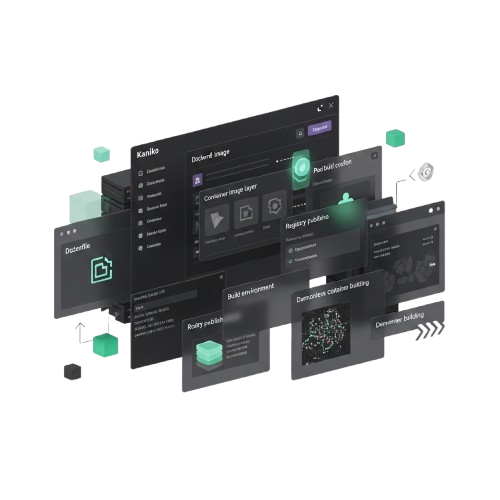

KANIKO–Faster CONTAINER Image Builds with Secure Execution

KANIKO is a lightweight CONTAINER image build tool that executes DOCKERFILE commands in userspace, enabling secure image creation without a DOCKER DAEMON while maintaining full compatibility with modern KUBERNETES and CI/CD environments

About KANIKO

Key Features of KANIKO

Daemonless Image Building

KANIKO builds container images directly in userspace without requiring a Docker daemon, enabling secure image creation in restricted and containerized environments.

Dockerfile Compatibility

This tool executes standard Dockerfile instructions, allowing developers to build images using familiar workflows while maintaining compatibility.

Lightweight Architecture

KANIKO is designed to run efficiently inside containers, using minimal system resources while still delivering reliable container image build performance.

CI/CD Pipeline Integration

When used in automated pipelines, KANIKO enables secure container image builds inside CI/CD environments without requiring privileged Docker access

Kubernetes Native Support

KANIKO works smoothly within Kubernetes clusters, ensuring compatibility with modern cloud-native infrastructure and container-based development workflows.

Secure Build Process

The tool focuses on secure container image building by eliminating the need for Docker daemon privileges in build environments, helping teams run container builds.

Efficient Layer Caching

KANIKO supports layer caching to reduce build time and improve efficiency when rebuilding container images with repeated steps.

Cloud-Native Friendly

KANIKO fits naturally into cloud-native environments by supporting container registries and scalable deployment workflows.

Simple Integration

Run KANIKO inside a container and build images using a Dockerfile without complex setup steps or additional system configuration.

How KANIKO Works

Dockerfile Instruction Execution

KANIKO reads the DOCKERFILE and executes instructions inside a container, allowing developers to build images without a Docker daemon.

Userspace Image Building

The tool performs the entire build process in USERSPACE, creating image layers securely while avoiding privileged system access in containerized environments.

Snapshot Layer Creation

KANIKO takes filesystem snapshots after each DOCKERFILE command and converts the changes into container image layers for efficient image construction.

Container Registry Push

After the image is built, KANIKO securely pushes the final container image directly to supported CONTAINER REGISTRIES such as Docker Hub or private registries.

Kubernetes Execution

KANIKO commonly runs inside KUBERNETES pods, allowing image builds to take place safely within cluster-based environments and cloud-native workflows.

Secure CI/CD Integration

KANIKO integrates with modern CI/CD PIPELINES, enabling automated container image builds without granting privileged Docker access to build systems.

Download KANIKO

Download KANIKO
KANIKO is distributed as an open-source container image build tool and can be accessed directly from its official repository. It is designed for easy deployment and seamless integration with Kubernetes environments and modern CI/CD workflows.

System Requirements

Container Platform: Compatible with Kubernetes and standard container runtimes listed in the documentation
Execution Environment: Kubernetes Pod or container-based build environment
Dockerfile Support: Standard Dockerfile format required for building images
Development Environment: CI/CD pipeline or containerized build system recommended

KANIKO Installation Guide

Download KANIKO

Download the latest KANIKO release from the official GitHub repository or include it directly in your CI/CD pipeline to ensure secure and reliable container image builds.
Set Up Build Environment

Prepare a containerized build environment such as a Kubernetes pod or Docker-compatible container, as KANIKO runs entirely in userspace without requiring a Docker daemon.

Configure Dockerfile

Place your DOCKERFILE in the project directory and ensure it follows standard Dockerfile syntax so KANIKO can process each instruction correctly.

Run KANIKO Build

Execute KANIKO with the configured Dockerfile and target container registry; KANIKO will build the image in userspace and push it securely to the specified registry.


Guide For KANIKO

Learn how to install, configure, and use KANIKO efficiently to build and push container images securely, execute Dockerfile instructions in userspace, and streamline CI/CD and Kubernetes workflows.

Trusted By Developers

KANIKO is trusted by developers worldwide to build and push container images securely, streamline CI/CD workflows, and optimize containerized environments efficiently and reliably.

KANIKO Common Questions

Get answers to common questions about KANIKO, including installation, configuration, Dockerfile compatibility, CI/CD integration, and building secure container images efficiently in Kubernetes and cloud-native environments.

Install KANIKO by downloading the latest release from the official GitHub repository or by including it in your CI/CD pipeline.

No, KANIKO runs entirely in userspace and does not require a Docker daemon.

KANIKO works on Linux-based containers and Kubernetes environments for building images.

Yes, KANIKO can be executed inside a container locally without elevated privileges.

You need a container runtime, a Dockerfile, and access to a container registry.

Yes, KANIKO is open-source and available under the Apache 2.0 license.

Set up a container with KANIKO, mount your project directory, and provide target registry credentials.

Yes, you can pass flags like --context, --dockerfile, and --destination to control builds.

Yes, you can use ARG and ENV instructions in Dockerfiles with KANIKO.

Yes, KANIKO supports layer caching to speed up repeated builds.

Provide the registry URL and authentication credentials via flags or configuration files.

Yes, multi-stage builds are fully supported for efficient image creation.

Yes, LazyDFU is fully compatible with Fabric Loader mods and improves startup speed without disrupting mod functionality.

Yes, RUN instructions execute shell commands inside the userspace build container.

Yes, you can build images for multiple platforms using appropriate flags.

Yes, any script invoked via RUN in the Dockerfile will execute normally.

KANIKO can build individual service images defined in Docker Compose files.

Yes, it processes each instruction step-by-step and supports layer caching for performance.

KANIKO runs in userspace, avoiding the need for privileged Docker daemon access.

Yes, it is optimized to build multiple images concurrently in containerized environments.

Yes, with layer caching and efficient execution, build times are significantly reduced.

Absolutely, it is widely used in production CI/CD workflows and Kubernetes clusters.

KANIKO snapshots the filesystem after each Dockerfile instruction, creating reproducible layers.

Yes, logs and output provide detailed information on execution time, layer creation, and push status.

Kaniko – Build and Push CONTAINER IMAGES Anywhere

Kaniko builds and pushes container images securely without Docker. Fast, reliable image creation for Kubernetes and CI/CD workflows.

Price: Free

Price Currency: $

Operating System: Windows, Mac, Linux

Application Category: Software

Editor's Rating:
4.6
Scroll to Top